com.surfshark.Surfshark
<em>Protect yourself with the Surfshark VPN bundle for Linux!</em>
Surfshark VPN app protects you on both public and private Wi-Fi. It offers a VPN with global server infrastructure, an integrated ad blocker, a dedicated IP option, and many features like double VPN.
Independently audited by Deloitte, Surfshark VPN doesn't track your activity and keeps it safe. Surfshark has 4,500+ RAM-only servers with speeds of at least 10 Gbps and reaching 100 Gbps in the most crowded areas.
Surfshark’s servers located in 100 countries worldwide are connected to an industry-first self-healing infrastructure Everlink that ensures even better VPN connection stability.
<em>Protect the entire household:</em>
Forget counting devices. With a single subscription, you'll get unlimited simultaneous connections. Connect and protect all your household devices with Surfshark VPN.
<em>Secure your data and privacy:</em>
Your ISP can see the websites you visit and the products you look for. With a VPN and its end-to-end encryption, your browsing remains private.
<em>Surf with blazing speeds:</em>
Surfshark offers 4,500+ servers in 100 countries. Use your favorite apps or browse websites lag-free with a secure and fast VPN connection.
<em>Keep your data private:</em>
Surfshark has a no-activity-logs policy, proven by audits, which ensures we don't see or collect your online activity.
<em>Stay safe on public Wi-Fi:</em>
Public Wi-Fi is a perfect space for hackers. And even more dangers might hide in these networks. A VPN connection protects your data and ensures that it's safe.
<em>Access internet without censorship:</em>
Censorship or internet restrictions while traveling might stand between you and your favorite things online. That's where a secure VPN steps in and helps you access your home content.
<em>Block ads and trackers:</em>
Websites collect info about you and display ads based on your online habits. Surfshark stops those annoying ads and protects you from malware attacks.
- <em>Discover more Surfshark Linux app features:</em>
- <em>Global server network</em> — travel the world without leaving your room with more than 4,500 VPN servers in over 100 countries.
- <em>Clean Web</em> — block ads, trackers, malware, and pop-ups.
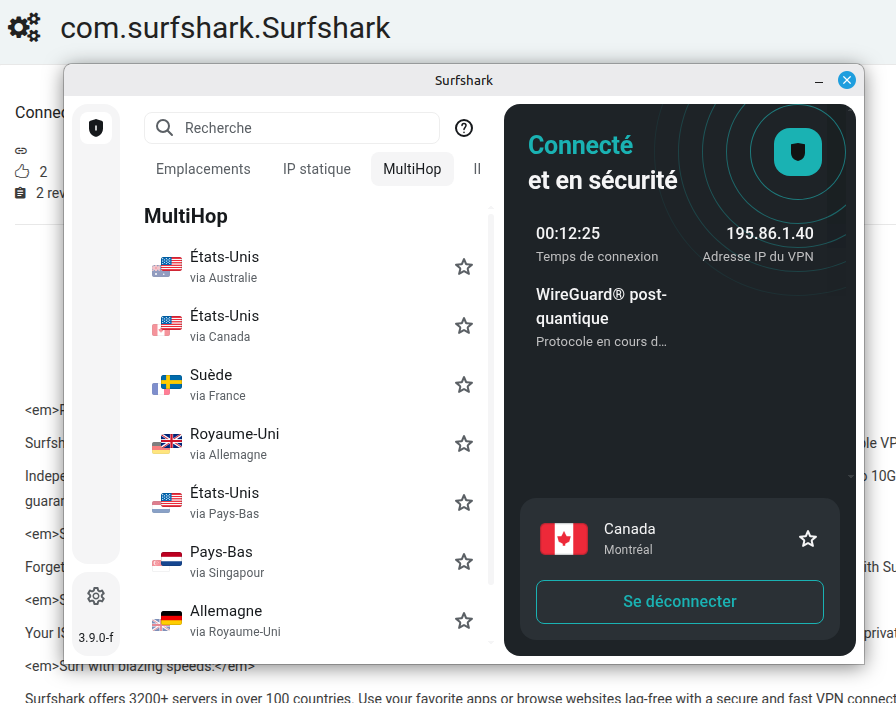
- <em>Multi Hop</em> — select two different servers to connect through simultaneously
- <em>Dedicated IP</em> — connect to your dedicated IP directly from your Linux devices.
- <em>Everlink</em> — get better IP protection with a self-healing mechanism that revives your connection by reconfiguring the VPN tunnel without disconnecting you from the VPN.
- <em>24/7 customer support</em> — get help via live chat, email, or social media. You can also check our Blog and Help Center.
If you have any questions, contact us directly at <em>support@surfshark.com</em> or via live chat.
Latest reviews

I have been using Surfshark for over a year now and I am very satisfied. However, there is something wrong with the Linux app: "MultiHop" is implemented but unlike the Windows and Android apps, you cannot "select two different servers to connect through simultaneously" as stated in the marketing description. You can only CHOOSE one of the 8 pre-configured options, and this is a big limitation IMHO. I really hope this changes soon and that Linux users will finally get the same features as users of other operating systems.

Works well on Mint 22.3, but lacks some critical features available on Windows/Android/iOS/macOS, specifically: Bypasser (Split Tunneling). I'm looking forward to the developers implementing this feature in the Linux client.