net.davidotek.pupgui2
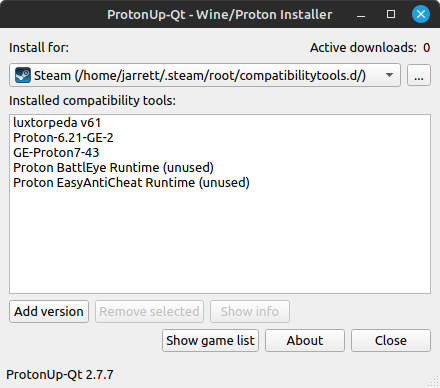
Install and manage Wine- and Proton-based compatibility tools for Steam and Lutris with this graphical user interface.
Supported launchers:
<ul><li>Steam</li><li>Lutris</li><li>Heroic Games Launcher</li><li>Bottles</li><li>WineZGUI</li><li>Both normal, Snap and Flatpak installations are supported</li></ul>
Supported compatibility tools:
<ul><li>GE-Proton</li><li>SteamTinkerLaunch</li><li>Proton-Tkg</li><li>Luxtorpeda</li><li>Boxtron</li><li>Roberta</li><li>NorthstarProton</li><li>Scrumplex's Steam-Play-None</li><li>Wine-GE</li><li>Lutris-Wine</li><li>Kron4ek's Vanilla Wine-Builds</li><li>DXVK and DXVK async (includes D8VK)</li><li>VKD3D</li></ul>
Double click compatibility tools to show more information and games using the tool.
Advanced settings and the color theme can be managed in the About dialog.
Latest reviews

5

Great for installing the latest proton (or multi-versions) in Lutris or other game launchers.

5
Very easy to install and update the newest custom proton versions (GE for example) and not only for Steam but also for Heroic :)
5

Definetly a 5/5. Makes you install the latest custom proton without any problems.